Blogger Tips and TricksLatest Tips And TricksBlogger Tricks
Showing posts with label Electrical. Show all posts

Tuesday, 2 August 2016

EAGLE PCB Desing

Schematic Editor
The goal of the schematic is to provide documentation about the design, allowing others to easily understand your design intent. EAGLE comes with thousands of pre-made parts that simplify your schematic capture tasks.
Layout Editor
You can locate your components accurately and route copper traces between them. EAGLE's Layout editor includes sophisticated features such as assembly variants, differential pair routing and much more.
Autorouter
The autorouter can be guided by adjusting its cost factors to control its routing behavior producing useful results in no time. The Autorouter protects prerouted traces giving you full control over what nets need to be manually routed and which can be routed automatically.
Download

KiCAD

A full Getting Started guide is included in the KiCad documentation, in multiple languages. This covers the process of creating and completing a simple project. We recommend that all new users read this first, in order to learn the basics.

Quick KiCad Summary
This is a quick summary of how KiCad functions. More details can be found in the full documentation.

Libraries
KiCad uses two separate types of library: symbols (.lib) and footprints (.pretty). Symbols are used to draw the schematic. Once symbols have been placed into the schematic, footprints are assigned to them, and then these are used to lay out the circuit board.

Saturday, 26 March 2016

BRL-CAD

BRL-CAD is a powerful open source cross-platform solid modeling system that includes interactive geometry editing, high-performance ray-tracing for rendering and geometric analysis, a system performance analysis benchmark suite, geometry libraries for application developers, and more than 30 years of active development.

BRL-CAD is a powerful cross-platform Open Source combinatorial Constructive Solid Geometry (CSG) solid modeling system that includes interactive 3D solid geometry editing, high-performance ray-tracing support for rendering and geometric analysis, network-distributed framebuffer support, image and signal-processing tools, path-tracing and photon mapping support for realistic image synthesis, a system performance analysis benchmark suite, an embedded scripting interface, and libraries for robust high-performance geometric representation and analysis.

Geomagic Design

Driving Engineering Forward with Geomagic Design
With comprehensive 3D CAD tools for design, engineering and preparation for manufacturing, Geomagic Design empowers rapid, accurate product development in an easy-to-use environment.

At a highly affordable price point, Geomagic Design delivers top-end tools at lower cost, including comprehensive assembly, parametric and direct editing tools, 2D documentation, sheet metal design, motion analysis and integrated CAD data sharing tools.

Thursday, 10 March 2016

GLE - Graphics Layout Engine

Description
GLE is a graphics scripting language designed for creating publication quality graphs, plots, diagrams, figures and slides. GLE relies on LaTeX for text output. Its output formats include EPS, PS, PDF, JPEG, and PNG. GLE (Graphics Layout Engine) is a graphics scripting language designed for creating publication quality figures (e.g., a chart, plot, graph, or diagram). It supports various chart types (including function plot, histogram, bar chart, scatter plot, contour plot, color map, and surface plot) through a simple but flexible set of graphing commands. More complex output can be created by relying on GLE's scripting language, which is full featured with subroutines, variables, and logic control. GLE relies on LaTeX for text output and supports mathematical formulae in graphs and figures. GLE's output formats include EPS, PS, PDF, JPEG, and PNG. GLE is licenced under the BSD license. QGLE, the GLE user interface, is licenced under the GPL license.

Categories
Graphics, Visualization

License
BSD License

FormScanner - Free OMR Software

Description
FormScanner is an OMR (Optical Mark Recognition) software that automatically marks multiple-choice papers.
FormScanner not bind you to use a default template of the form, but gives you the ability to use a custom template created from a simple scan of a blank form.
The modules can be scanned as images with a simple scanner and processed with FormScanner software.
All the collected information can be easily exported to a spreadsheet.

Categories
Information Analysis

License
GNU General Public License version 3.0 (GPLv3)

NetToPLCSim

Overview
NetToPLCSim extends the Siemens PLC Simulation Software "PLCSIM" by a TCP/IP network interface for variable services, so you can test your HMI/SCADA-Software together with PLCSIM without real hardware.

Version information
There are two versions of NetToPLCSim which are using a different interface to exchange data with

PLCSim:
S7online-Version. All versions since V0.9.x.
S7ProSim-Version. All versions V0.7.x and before It's recommended to use the S7online-Version.

Saturday, 5 March 2016

Logic Gate Simulator

Logic Gate Simulator is an open-source tool for experimenting with and learning about logic gates. The simulator tool was originally designed for CIS students at South Puget Sound Community College but is free for anyone to use and modify under the GPL v3.

Logic Gate Simulator is written in C#/WPF using .NET 4
Watch a 3 minute video demonstration
Dave Jordan has implemented a multiplier, download am.gcg

Selected Features

  1. Graph circuit activity over time
  2. Drag-and-drop gate layout and wiring
  3. User created "integrated circuits" for re-use
  4. Viewing the activity inside ICs during simulation
  5. Adjustable simulation speed and zoom
  6. Print and export as image
  7. Cut/copy/paste
  8. Inline ICs and flatten entire circuits


PICsim - PIC microcontroller simulator

Description
PICsim emulates a microcontroller PIC16F628/16F777/16F877A/18F452/18F4550/18F4620 and periferics such as USART and timers, the simulator architecture permit easy implementation of external elements in c language. PicsimLab is a realtime emulator of development boards with integrated MPLABX debugger.
Categories
Testing, Simulations, Electronic Design Automation (EDA), Computer Aided Instruction (CAI)
License
GNU General Public License version 2.0 (GPLv2)

Advanced HMI

Manufacturing Automation is a software development company that specializes in software for automation and manufacturing.


AdvancedHMI is our most popular off-the-shelf packages. It is used to build HMI applications for machinery or facility control. It has several advantages over other HMI software and hardware. These include unlimited flexibility, extend-ability, and cost. The base package is absolutely free and unrestricted, so give it a try for yourself.

Features

  • Allen Bradley DF1 RS232 Driver
  • Allen Bradley Ethernet/IP Driver for SLC,MicroLogix, ControlLogix, and CompactLogix
  • Beckhof TwinCAT Driver, ModbusTCP and ModbusRTU drivers
  • Omron Drivers
  • Drivers are accessible via VB or C# code
  • Build an HMI in Visual Studio 2010-2013 (free) without writing any code
  • Works with Visual Studio Community Edition
  • Tested on Mono on Linux (except OPC driver)
  • Even Works on the Raspberry Pi

ngspice

Ngspice is a mixed-level/mixed-signal circuit simulator. Its code is based on three open source software packages: Spice3f5, Cider1b1 and Xspice. It is the open source successor of these venerable packages. Many, many modifications, bug fixes and improvements have been added to the code, yielding a stable and reliable simulator. Therefore, besides being used as a standalone simulator, Ngspice has been incorporated into many projects, see our simulation environments page.

Spice3 does not need any introduction, is the most popular circuit simulator. In over 30 years of its life Spice3 has become a de-facto standard for simulating circuits.

Cider couples Spice3f5 circuit level simulator to DSIM device simulator to provide greater simulation accuracy of critical devices. DSIM devices are described in terms of their structures and materials.

Thursday, 3 March 2016

Arduino- Software

The open-source Arduino Software (IDE) makes it easy to write code and upload it to the board. It runs on Windows, Mac OS X, and Linux. The environment is written in Java and based on Processing and other open-source software.
This software can be used with any Arduino board.
Refer to the Getting Started page for Installation instructions.

Wednesday, 2 March 2016

QUCS : A circuit simulator with graphical user interface (GUI)

Qucs stands for Quite Universal Circuit Simulator. So far Qucs is not yet finished, but it is already packed with features. Take a look at the screenshots to get a feel for what it can do. Qucs is an integrated circuit simulator which means you are able to setup a circuit with a graphical user interface (GUI) and simulate the large-signal, small-signal and noise behaviour of the circuit. After that simulation has finished you can view the simulation results on a presentation page or window. Qucs, briefly for Quite Universal Circuit Simulator, is a circuit simulator with graphical user interface (GUI). The GUI is based on Qt® by Digia®. The software aims to support all kinds of circuit simulation types, e.g. DC, AC, S-parameter, Harmonic Balance analysis, noise analysis, etc.
Qucsator, the simulation backend, is a command line circuit simulator. It takes a network list in a certain format as input and outputs a Qucs dataset. It has been programmed for usage in the Qucs project but may also be used by other applications.
The Qucs GUI is well advanced and allows setting up schematics and presenting simulation results in various types of diagrams. DC, AC, S-parameter, noise and transient analysis is possible, mathematical equations and use of a subcircuit hierarchy (with parameterised subcircuits) are available. Qucs can also import existing SPICE models for use in your simulations.

While Qucs is well developed, we still strive to improve the project, and will always welcome offers of help. Qucs doesn't just need help with programming, it also needs graphics, high quality example schematics, tutorials for the website and lots more.

Qucs comes with a huge array of components and models including HICUM, BSIM2, BSIM3, and soon BSIM6. It also provides many semiconductor based components and models such as OpAmps, Diodes, MOSFETs, PMOSFETs and many more. Some example schematics can be found here which demonstrate some of the abilities of Qucs, and many more examples are provided with the program.
Operating Systems

Qucs is currently developed under the GNU/Linux OS using the standard autotools with no special effort to support other operating systems. However Qucs is said to be successfully compiled and run on Windows, Solaris, NetBSD, FreeBSD, MacOS, and Cygwin... help is needed !

Logisim

Description
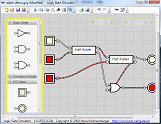
An educational tool for designing and simulating digital logic circuits, featuring a simple-to-learn interface, hierarchical circuits, wire bundles, and a large component library. As a Java application, it can run on many platforms.

Logisim is an educational tool for designing and simulating digital logic circuits. With its simple toolbar interface and simulation of circuits as you build them, it is simple enough to facilitate learning the most basic concepts related to logic circuits. With the capacity to build larger circuits from smaller subcircuits, and to draw bundles of wires with a single mouse drag, Logisim can be used (and is used) to design and simulate entire CPUs for educational purposes.

Logisim is used by students at colleges and universities around the world in many types of classes, ranging from a brief unit on logic in general-education computer science surveys, to computer organization courses, to full-semester courses on computer architecture.

Description
LibreCAD is a fully comprehensive 2D CAD application that you can download and install for free. There is a large base of satisfied LibreCAD users worldwide, and it is available in more than 20 languages and for all major operating systems, including Microsoft Windows, Mac OS X and Linux, including Debian, Ubuntu, Fedora, Mandriva, Suse, etc.
LibreCAD is a free Open Source CAD application for Windows, Apple and Linux. Support and documentation is free from our large, dedicated community of users, contributors and developers. You, too, can also get involved!

GNU PLOT

Gnuplot is a portable command-line driven graphing utility for Linux, OS/2, MS Windows, OSX, VMS, and many other platforms. The source code is copyrighted but freely distributed (i.e., you don't have to pay for it). It was originally created to allow scientists and students to visualize mathematical functions and data interactively, but has grown to support many non-interactive uses such as web scripting. It is also used as a plotting engine by third-party applications like Octave. Gnuplot has been supported and under active development since 1986.

Gnuplot supports many different types of 2D and 3D plots

Here is a Gallery of demos.

Gnuplot supports many different types of output

interactive screen display:cross-platform (Qt, wxWidgets, x11) or system-specific (MS Windows, OS/2)
direct output to file:postscript (including eps), pdf, png, gif, jpeg, LaTeX, metafont, emf, svg, ...
mouseable web display formats:HTML5, svg

Monday, 11 January 2016

PSCAD (Power Systems CAD)

It is a powerful and flexible graphical  user interface to the world-renowned, EMTDC solution engine. PSCAD enables the user to schematically construct a circuit, run a simulation, analyze the results, and manage the data in a completely integrated, graphical environment. Online plotting functions, controls and meters are also included, so that the user can alter system parameters during a simulation run, and view the results directly.

Tuesday, 20 October 2015

ArcGIS Desktop

Professional GIS Authoring
There are lots of ways to make a map. But if people use your maps to make decisions that save money, time, or even lives, then you need to put science to work for you. Use ArcGIS for Desktop to build maps with up-to-date data, combined with deep analysis, and share them where they’ll have the most impact.


Create Smart Maps and Useful Apps

Visualize and share information in new ways for insightful and informed decision making. Map and manage your data with ArcGIS for Desktop, then create apps and share with others via the rest of the ArcGIS platform. ArcGIS for Desktop includes ArcGIS Online, so you immediately have access to a world of relevant content and ready-to-use apps to get you started right away.

PCB Design Software

FREE COMMERCIALLY-PROVEN PCB DESIGN SOFTWARE TO DESIGN WITHOUT LIMITATION.

Our Free PCB Design software design suite consists of sophisticated schematic capture, layout, and auto-routing tools. Solo PCB Design delivers unrestricted full featured capability, not a limited version of another program and supports a range of capabilities from small single sided to large 16 layer PCBs with advanced technologies. Manufacturer Directory

ANSYS

Computer-aided engineering is playing a growing role in higher education in the disciplines of science and engineering. At the undergraduate level, students use engineering simulation to learn physics principles and gain hands-on, real-world experience that can jump-start their careers. At the postgraduate level, researchers apply simulation tools to solve complex application problems. Commercial organizations regularly partner with educational institutions to foster innovative research — sometimes at the basic level — that can lead to breakthrough solutions.